Install CLI
Run HolmesGPT from your terminal as a standalone CLI tool.
Installation Options
-
Add our tap:
-
Install HolmesGPT:
-
To upgrade to the latest version:
-
Verify installation:
-
Install pipx
-
Install HolmesGPT:
-
Verify installation:
For development or custom builds:
-
Install Poetry
-
Install HolmesGPT:
-
Verify installation:
Run HolmesGPT using the prebuilt Docker container:
docker run -it --net=host \
  -e OPENAI_API_KEY="your-api-key" \
  -v ~/.holmes:/root/.holmes \
  -v ~/.aws:/root/.aws \
  -v ~/.config/gcloud:/root/.config/gcloud \
  -v $HOME/.kube/config:/root/.kube/config \
  us-central1-docker.pkg.dev/genuine-flight-317411/devel/holmes ask "what pods are unhealthy and why?"
Note: Use
-eflags to pass API keys for your provider (e.g.,-e ANTHROPIC_API_KEY,-e GEMINI_API_KEY). See Environment Variables Reference for the complete list.
Quick Start
Choose your AI provider (see all providers for more options).
Which Model to Use
We highly recommend using Sonnet 4.0 or Sonnet 4.5 as they give the best results by far. These models are available from Anthropic, AWS Bedrock, and Google Vertex. View Benchmarks.
No Kubernetes Required
The examples below use a Kubernetes pod for a quick guided demo, but HolmesGPT works with any infrastructure. If you don't use Kubernetes, skip the kubectl apply step and ask about your own systems instead:
holmes ask "what Prometheus alerts are currently firing and why?"
holmes ask "what is the health of my Elasticsearch cluster?"
holmes ask "are there any issues with my production databases?"
-
Set up API key:
-
Create a test pod to investigate:
-
Ask your first question:
Note: You can use any Anthropic model by changing the model name. See Claude Models Overview for available model names.
See Anthropic Configuration for more details.
-
Set up API key:
-
Create a test pod to investigate:
-
Ask your first question:
See OpenAI Configuration for more details.
-
Set up API key:
-
Create a test pod to investigate:
-
Ask your first question:
See Azure OpenAI Configuration for more details.
-
Set up API key:
-
Install boto3:
-
Create a test pod to investigate:
-
Ask your first question:
See AWS Bedrock Configuration for more details.
-
Set up API key:
-
Create a test pod to investigate:
-
Ask your first question:
See Google Gemini Configuration for more details.
-
Set up credentials:
-
Create a test pod to investigate:
-
Ask your first question:
See Google Vertex AI Configuration for more details.
-
Set up API key: No API key required for local Ollama installation.
-
Create a test pod to investigate:
-
Ask your first question:
holmes ask "what is wrong with the user-profile-import pod?" --model="ollama_chat/<your-model-name>"For troubleshooting and advanced options, see Ollama Configuration.
Warning: Ollama can be tricky to configure correctly. We recommend trying HolmesGPT with a hosted model first (like Claude or OpenAI) to ensure everything works before switching to Ollama.
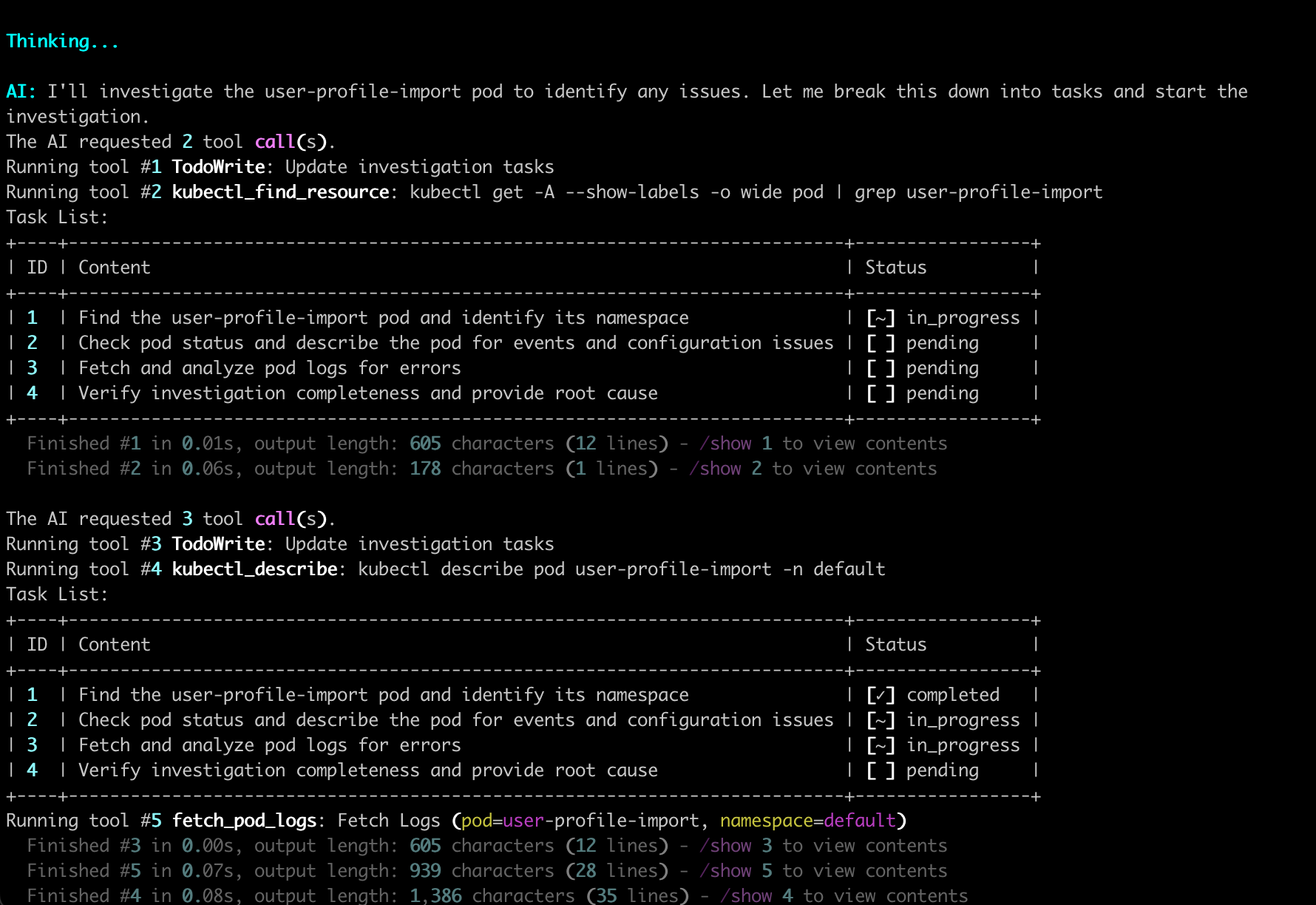
After running the command, HolmesGPT begins its automated investigation, as shown below.
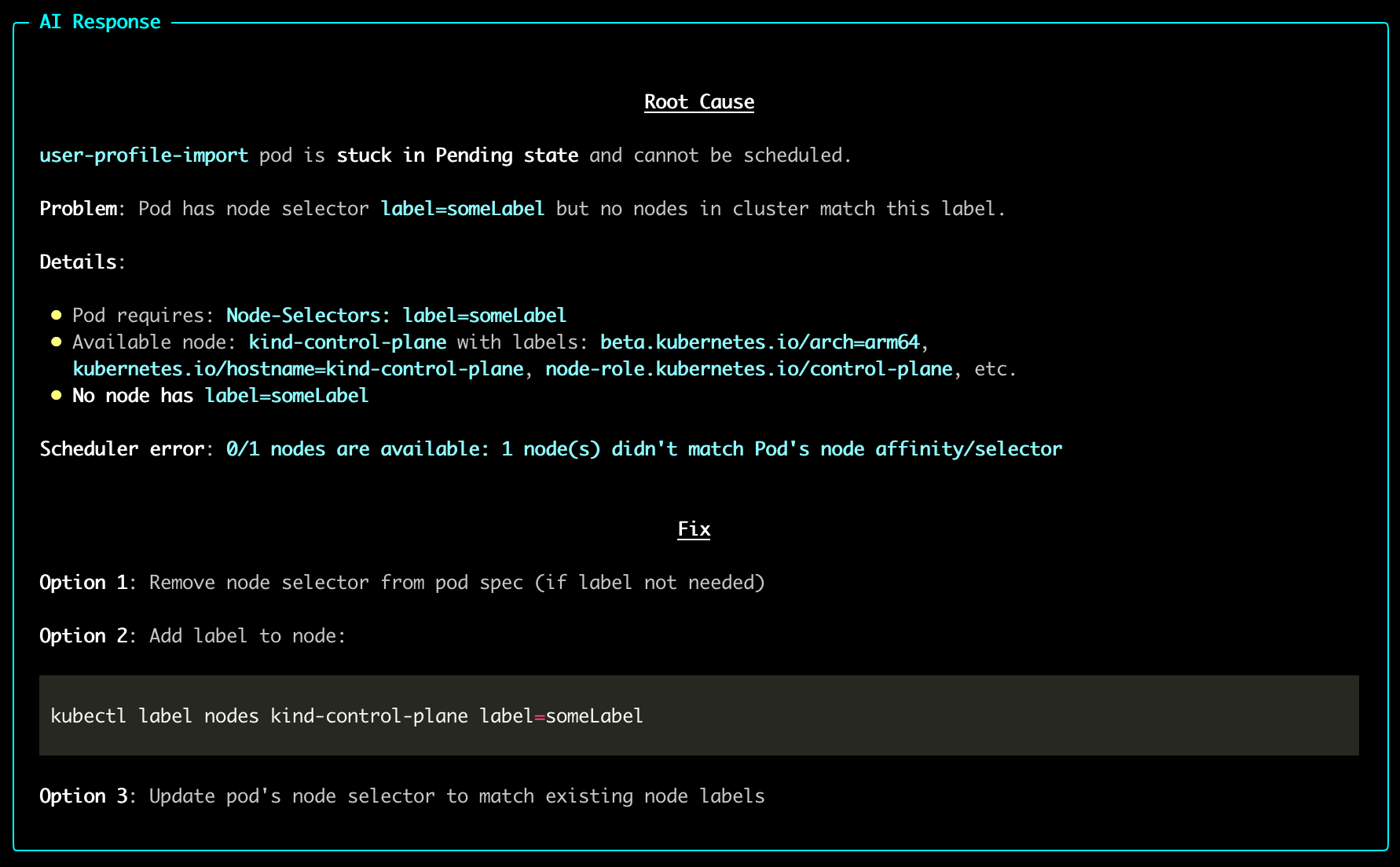
Once the analysis completes, HolmesGPT provides a clear root-cause summary and fix suggestions.
Using Multiple Models
If you work with multiple AI providers or model configurations, you can define them in a YAML file and switch between them by name with --model=<name>. See Using Multiple Providers for setup instructions.
Next Steps
- Recommended Setup - Connect metrics, logs, and cloud providers to unlock deeper investigations.
- All Data Sources - Browse the full list of 38+ built-in integrations.
- Connect MCP Servers - Extend capabilities with external MCP servers.
Need Help?
- Join our Slack - Get help from the community
- Request features on GitHub - Suggest improvements or report bugs.
- Troubleshooting guide - Common issues and solutions.